

January 15th 2026 – FlightControlSpotter is officially launching on the Microsoft Flight Simulator Marketplace, marking its first availability on the platform and introducing full Xbox Series X|S support when purchased via the Marketplace. The tool has been specifically coded and tested to ensure smooth operation on console.
In parallel, Update v1.1 is now available for all existing SIMMARKET customers. New customers on the Microsoft Marketplace will receive FlightControlSpotter directly with this latest version.
Update v1.1 significantly expands how you discover, create, and manage your spotting locations—bringing a new level of freedom to plane spotting inside Microsoft Flight Simulator.
At the core of this update is the new Point of Interests (POI) management system.
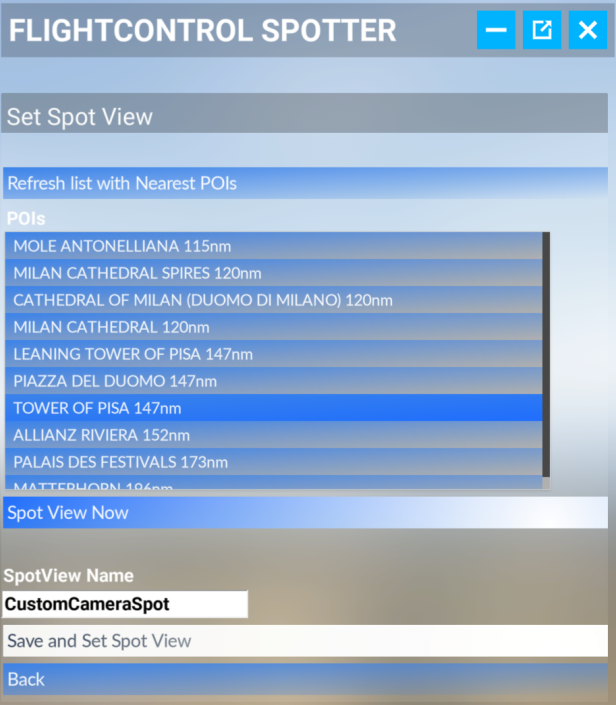
FlightControlSpotter can now automatically detect nearby landmarks and POIs, allowing you to instantly use them as ready-made spot positions. Towers, airport surroundings, and notable locations become natural observation points, available in just a click.
For even more control, you are free to move anywhere in the world and create your own custom spot. Once positioned, your location can be saved with a custom name, then loaded again at any time—building your own personal spotting database.

This opens the door to entirely new use cases:
- A carefully chosen plane spotter position near a major international airport?
Set it once, save it, and return anytime to observe AI traffic flows. - Acting as a jury member or observer during a multiplayer bush session?
Take your seat, record the location, roam freely, and jump back instantly to your saved vantage point. - A stunning scenery angle, a beach at the runway threshold, or a dramatic approach over water?
Capture the position and keep it among your custom locations, ready whenever inspiration strikes.
All saved POIs can be managed directly from the in-sim panel, with simple options to load or delete them as needed. Everything is stored locally, keeping your setup clean, fast, and entirely under your control.
With Update v1.1, FlightControlSpotter is no longer just a viewing tool—it becomes your personal map of unforgettable viewpoints across the world of Microsoft Flight Simulator.
August 30th 2025 – FlightControlTools proudly announces the release at SIMMARKET of FlightControlSpotter, a brand-new utility for Microsoft Flight Simulator 2024 and 2020, designed to bring the excitement of tower views and plane spotting – fast, simple, and immersive.
Perfect for active flight simmers willing to switch to the control tower position in a click, for screenshot artists, flightsim content creators, plane spotters of AI traffic, virtual pilots and controllers in multiplayer sessions, FlightControlSpotter transforms your simulator into a true virtual spotting platform. Fully integrated as an in-sim toolbar panel, the utility gives you instant access to tower perspectives, nearby airport views, or your own custom spotting locations anywhere in the world.
Key Features of FlightControlSpotter
- Nearest Tower View – Instantly jump to the control tower of the closest airport. The panel displays ICAO code and airport name for quick access.
- Spot View by ICAO – Browse airports within a 200 NM range, select a runway or parking position, and teleport to Tower or Spot View to watch live traffic. Save your favorite locations for later use.
- new Spot View by POI – Auto-detects the nearby and famous landmarks / points of interest according to your current position.
- Custom Spot Views – Define your own spotting location by capturing latitude, longitude, and altitude from your aircraft or avatar, then save it with a custom name. You can also manually insert coordinates and altitude of your choice.
- Manage Views Easily – Load or delete your saved views with a simple panel interface. Everything is stored locally for quick retrieval.
- Drone Camera Integration – Built on the default MSFS drone camera, giving you complete freedom of movement, zoom, and angle control.
- Instant Return to Cockpit – Resume full aircraft control at any time with the Take Plane Control shortcut.
Pricing & Launch Offer
• Standalone – €15.00 (excl. VAT)
• Bundle – €32.99 (excl. VAT)
• Upgrade – €12.50 (excl. VAT)
Availability
Released at SIMMARKET.com, for Windows PC only, and also on Microsoft Marketplace via the in-game store for both MSFS24/20 with Xbox console support (when purchased via the store integrated in the simulator).
Elevate your flight sim experience—whether spotting heavy traffic at major hubs, exploring hidden airfields, or capturing stunning screenshots—FlightControlSpotter makes it all possible.
Quick User Guide PDF Free download here.
Official Trailer 4K by AviationLads
Gallery


